




Ailytics raises US$7.4M Series ARead more

Suspended Load Safety Detection

Detect workers under suspended loads. Ailytics enhances suspended load safety by triggering alerts the moment a worker steps into the danger zone.

Live in under 2 weeks on your existing cameras.

Trusted on 400+ projects worldwide

  • Changi Airport Group
  • Woh Hup
  • DHL
  • Obayashi
  • Laing O’Rourke
  • Land Transport Authority
  • Rogers-O’Brien Construction
  • NatSteel
  • Up to 80% reduction in safety non-compliance
  • 50+ configurable safety, security and productivity use cases
  • <2 weeks to go live on the cameras you already own

Where do manual lift checks fall short?

Several cranes can lift at once while crews move between work areas. A lifting supervisor cannot watch every load and everyone beneath it.

Detect workers under suspended loads across existing cameras

Ailytics works out depth from one standard camera and projects a drop zone on the ground beneath each suspended load, then alerts supervisors the moment a worker steps into it.

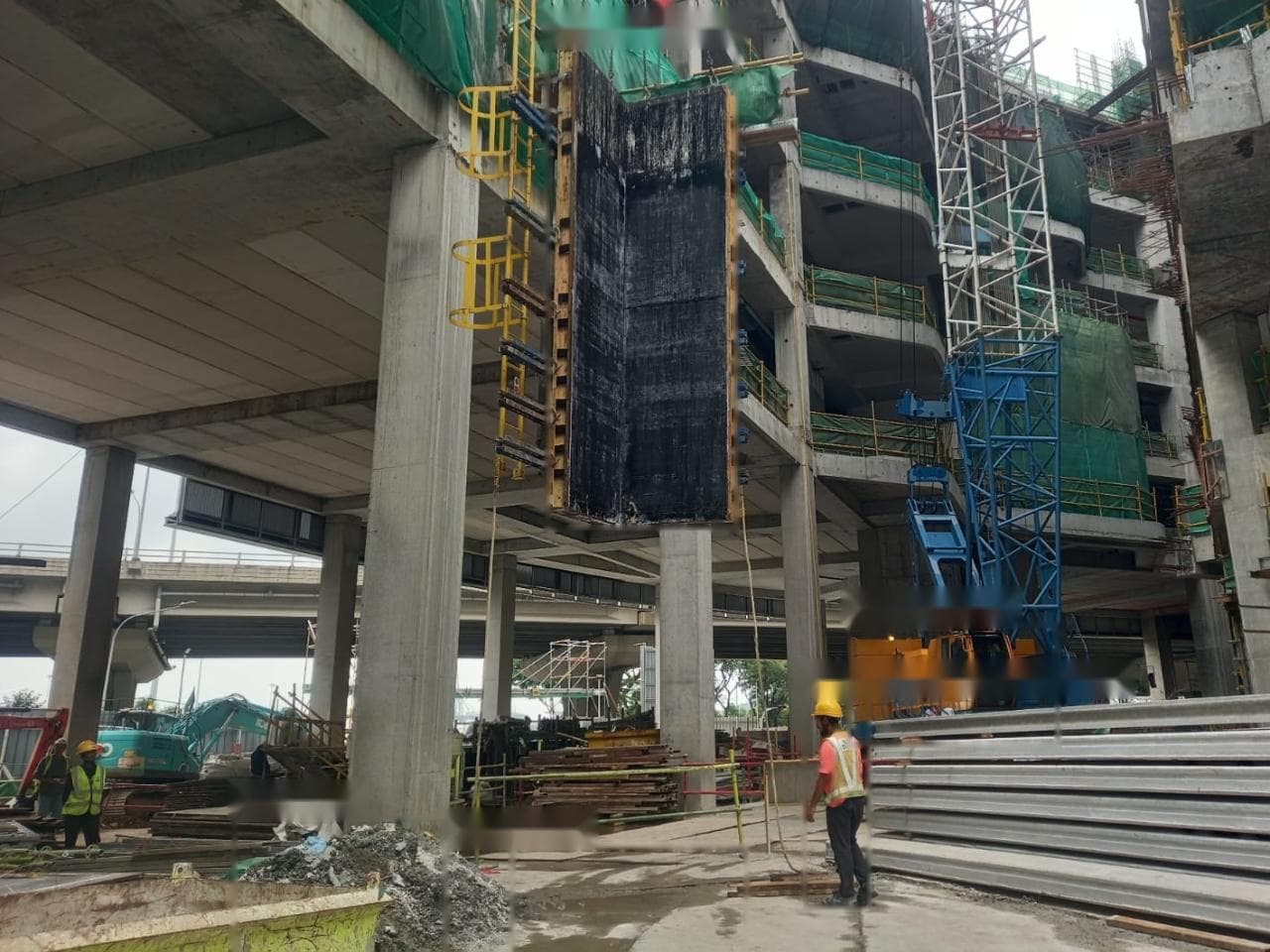
Construction-site camera: a suspended formwork panel with its drop zone projected on the ground, and a worker inside the zone flagged by Ailytics.Suspended loadWorker in drop zone
Cam 03 · Lifting area
Worker under suspended load · Cam 03Lifting area · load moving · 10:42
Sent to the lifting supervisorFrame, time and location attached · 10:42
Event logged for reviewAdded to the weekly safety report
  1. Define the drop zone

    Choose the cameras and lifting areas to watch, then set the radius and dwell time for the zone projected beneath each load.

  2. Detect a worker crossing it

    Flag a worker whose feet enter the projected drop zone while the load is moving.

  3. Notify with frame, time and location

    Send the lifting supervisor the event evidence, so they can clear the area while the load is still overhead.

  4. Log events for review

    Collect events in reports for lift reviews and toolbox talks, and track them alongside your TRIR.

Suspended load checks your team can act on

Connect your cameras, set the drop zones each lift needs, and give supervisors alerts and reports that support daily lifting work.

Safety

See where a load would fall

Project a drop zone flat on the ground beneath each suspended load and flag workers whose feet enter it. Alerts fire only while the load is moving. Set the zone radius and dwell time for each lifting area, with a cooldown per person so one crossing raises one alert.

  • Ground-level drop zone projection
  • Alerts only while the load moves
  • Configurable radius and dwell time

Camera connection

Use cameras you already own

Connect existing IP cameras and compatible recording systems through RTSP or ONVIF. Ailytics works out depth from a single standard camera, with no LiDAR, radar, or stereo rig, so you can add suspended load monitoring without replacing cameras. Coverage is assessed against your lifting areas and camera views.

  • Existing IP cameras
  • RTSP and ONVIF connections
  • Depth from one standard camera

Response

Give supervisors evidence to respond

Notify the right people when a worker enters the drop zone. Include the event frame, time, and location so the lifting supervisor can clear the area. Grace periods and cooldowns stop one event from sending repeat alerts.

  • Drop zone notifications
  • Event frame, time, and location
  • Grace periods and cooldowns

Compliance

Bring lift evidence into reviews

Generate safety and compliance reports on demand. Use logged suspended load events in audits, lift reviews, and toolbox talks, and track them alongside your total recordable incident rate (TRIR).

  • Reports on demand
  • Logged event evidence
  • Support for audits and toolbox talks
Alerts Incident evidence
Illustrative camera evidenceCamera 03 · Lifting area
ILLUSTRATIVE INCIDENT

Worker under suspended load

Camera evidence and event details attached.

Incident reportReady
Event details
Camera evidence
Review history
Report compiled with supporting evidencePDF
Evidence → event record → reportIllustrative workflow

Frequently asked questions

What is suspended load detection for construction sites?

Suspended load detection uses computer vision to keep workers out from under lifted loads. Ailytics works out depth from a single CCTV camera, projects the drop zone onto the ground beneath a load, and predicts where the load would fall. When a worker's feet enter that zone while the load is moving, it notifies supervisors with the frame, time, and location. This adds ongoing camera monitoring to your lifting plans and the checks your lifting team already does.

Can suspended load detection use our existing construction CCTV cameras?

Yes. Ailytics connects to existing IP cameras and compatible recording systems through RTSP or ONVIF, which are methods for accessing video feeds. Each view needs one standard camera, with no LiDAR, radar, or second camera. For lifting areas, cameras work best mounted 10 to 60 m high and tilted 45 to 60 degrees down, covering lifts 5 to 60 m away. Bring representative site footage to the demo for a coverage assessment.

How does Ailytics tell when a worker is under a suspended load?

A flat 2D check, where a person's box overlaps the load's box in the image, can fire for anyone who only looks close to the load from the camera's angle. Ailytics converts the 2D view into 3D, projects the drop zone flat on the ground beneath the load, and checks whether a worker's feet are inside it. It also checks whether the load is moving, so a crew working near a parked crane does not set off alerts.

Does suspended load detection work in rain, dust, and low light?

Ailytics' models are fine-tuned for heavy industries and conditioned for harsh site conditions, including rain, dust, and low light, with up to 99% detection accuracy depending on the scenario. Detection still depends on usable footage and a clear view of the load and the ground beneath it. Share examples from different shifts and weather conditions so the team can assess where your current cameras provide suitable coverage.

Can we reduce repeated suspended load alerts?

Set grace periods and cooldowns per camera and person to reduce repeat notifications from the same event. Alerts fire only while the load is moving, so a parked crane does not keep sending them. Match these settings to each lifting area and the way supervisors respond during a shift.

Can suspended load footage stay on our construction site's network?

Yes. The Ailyssa detection engine can run on edge, on-premise, or cloud infrastructure. On-premise deployment allows data to stay on-site. Your IT and safety teams can review the deployment approach together, including video access, storage, network requirements, and how supervisors receive alerts. Ailytics is ISO/IEC 27001 certified. Discuss your project's requirements during the demo.

Can we combine suspended load detection with other construction safety checks?

Yes. Suspended load detection can sit alongside open edge detection, PPE detection, pedestrian detection near machinery, and restricted-area alerts in the same platform. Pedestrian detection uses the same single-camera depth to measure the real distance between workers and moving machinery. Select the checks that fit each work area and its camera coverage. See the construction industry page for how Ailytics combines safety monitoring with workforce tracking and visual progress records across a construction site.

See suspended load detection on your site

Bring your CCTV views and lifting plans. See how Ailytics can help your supervisors keep workers out of drop zones during every lift.

Request a demo